7 Signs Your Company Has Outgrown QuickBooks—and What to Do Next
QuickBooks is one of the most popular accounting platforms for small businesses, and for many organizations it continues to be the right solution. However, as companies grow, financial management becomes more complex. Additional users, expanding inventory, multiple locations, ecommerce, and more sophisticated reporting requirements can quickly expose the limits of an accounting system that was designed for smaller operations.
If you're finding yourself adding spreadsheets, third-party applications, or manual workarounds just to keep up, it may be time to evaluate your next step.
This guide will help you determine whether you should:
- Continue using QuickBooks
- Extend QuickBooks with additional applications
- Move to a unified ERP like NetSuite
.
When QuickBooks Still Makes Sense
QuickBooks is still an excellent choice if your business:
• Operates as a single legal entity
• Doesn't manage complex inventory
• Has only a few accounting users
• Doesn't require advanced reporting or approvals
• Doesn't need extensive automation
If this describes your business, there may be little reason to replace QuickBooks today.
1-Minute Audio Recap: What Finance Leaders Need to Know About Scaling Beyond QuickBooks
7 Signs You've Outgrown QuickBooks
1. Your Business Has Multiple Companies or Legal Entities
Managing several subsidiaries, locations, or legal entities often means exporting data, consolidating spreadsheets, and reconciling financials manually.
A modern ERP centralizes financial reporting while allowing each entity to maintain its own books.
Common warning signs
- Multiple company files
- Manual consolidations
- Intercompany transactions
- Different currencies
2. Inventory Management Has Become Too Complex
Many businesses begin adding applications like Fishbowl or other inventory systems to compensate for QuickBooks' limitations.
If you're managing:
- Multiple warehouses
- Serialized inventory
- Lot tracking
- Demand planning
- Manufacturing
you may benefit from an ERP with built-in inventory management.
Learn More: From QuickBooks + Fishbowl to NetSuite
3. Reporting Requires Too Much Manual Work
If every executive meeting starts with someone updating spreadsheets, your reporting process is slowing your business down.
Growing organizations often need:
- Department reporting
- KPI dashboards
- Budget vs Actual
- Real-time profitability
- Cash flow forecasting
Instead of exporting data every month, ERP systems provide live dashboards and customizable reporting.
4. Approvals and Internal Controls Are Difficult to Manage
As your company grows, financial controls become increasingly important.
Questions to ask:
- Can invoices be approved electronically?
- Are purchase approvals automated?
- Can users only access what they should?
- Is every change tracked?
If approvals rely on emails and paper signatures, you've likely outgrown basic accounting software.
5. Revenue Recognition Is Becoming More Complex
Subscription businesses, SaaS companies, project billing, and recurring revenue often require more sophisticated accounting.
Warning signs include:
- Deferred revenue spreadsheets
- Manual journal entries
- ASC 606 compliance concerns
- Contract-based billing
ERP systems automate much of this complexity.
6. Ecommerce and Third-Party Applications Are Taking Over
Many growing businesses slowly build a technology stack around QuickBooks.
You may have separate software for:
- CRM
- Inventory
- Ecommerce
- Shipping
- Payroll
- Expense management
- Forecasting
While each application solves one problem, managing dozens of integrations often creates more work than it saves.
This is commonly referred to as "application sprawl."
7. Your Finance Team Is Spending More Time Maintaining Systems Than Growing the Business
The biggest sign you've outgrown QuickBooks isn't necessarily accounting—it's productivity.
If your finance team spends most of their time:
- importing spreadsheets
- fixing integrations
- reconciling systems
- correcting duplicate data
- preparing reports manually
your software may be limiting growth instead of supporting it.
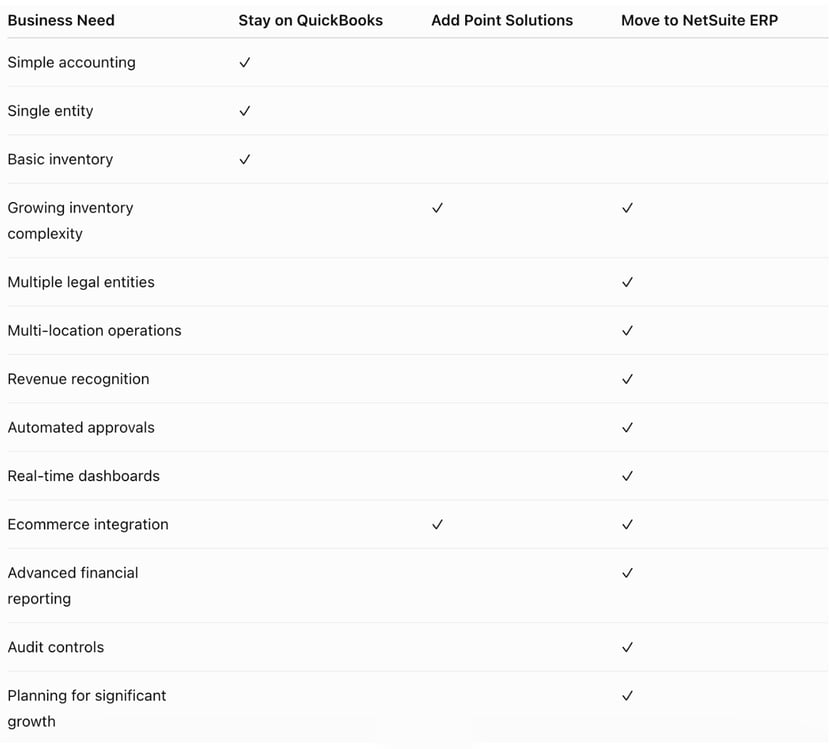
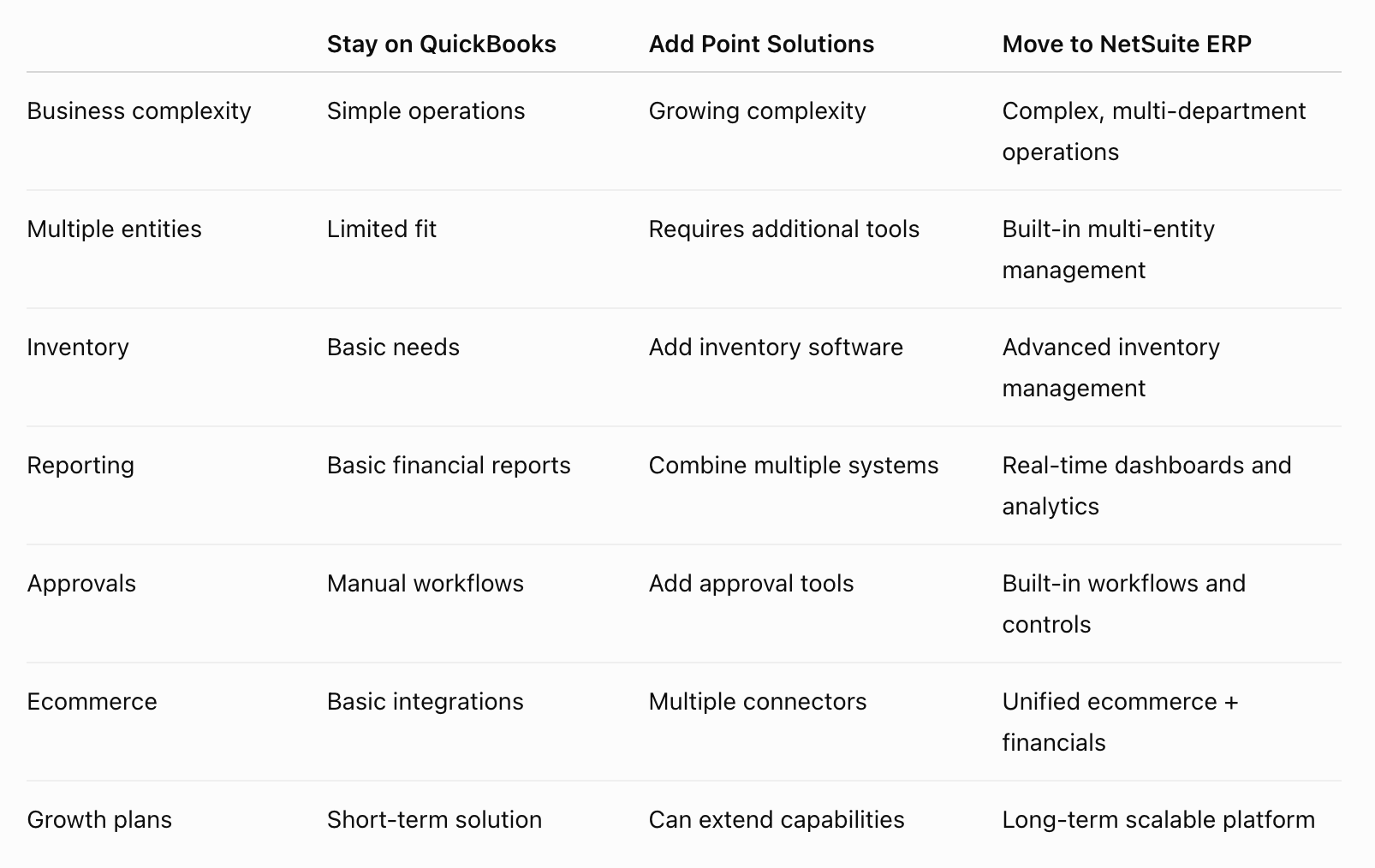
Should You Stay on QuickBooks, Add Point Solutions, or Move to ERP?

What Happens When Companies Keep Adding Point Solutions?
While adding specialized software can extend QuickBooks, it often introduces new challenges:
- Multiple databases
- Duplicate data entry
- More integrations to maintain
- Higher software costs
- Limited visibility across departments
Eventually many companies discover they're managing software instead of managing the business.
That's often when organizations begin evaluating unified ERP platforms.
Your Ecommerce Operations Are Outgrowing Your Accounting System
As online sales grow, businesses often need their accounting system to connect with ecommerce platforms, payment processors, inventory systems, and fulfillment operations.
Warning signs include:
- Manually importing ecommerce orders
- Reconciling sales across multiple channels
- Limited visibility into profitability by channel
- Delayed inventory updates
An ERP connects ecommerce, order management, inventory, and financials to provide a complete view of business performance.
Why Many Growing Companies Choose NetSuite
NetSuite combines financial management, inventory, CRM, purchasing, order management, reporting, ecommerce, and business intelligence into a single cloud platform.
Instead of connecting multiple systems together, businesses operate from one source of truth with real-time visibility across the organization.
Benefits include:
- Financial consolidation
- Multi-entity management
- Built-in inventory
- Automated workflows
- Role-based dashboards
- Audit trails
- Revenue recognition
- Native reporting
- Scalable cloud platform
Choosing a new ERP doesn't have to happen overnight.
Start by asking:
- Are our workarounds increasing every year?
- Are spreadsheets replacing system reports?
- Are we adding software faster than we're removing it?
- Can our accounting system support our growth over the next five years?
If you answered "yes" to several of these questions, it may be time to evaluate whether a unified ERP would better support your business.

When Point Solutions Stop Scaling
Many businesses initially solve QuickBooks limitations by adding separate applications for inventory, CRM, ecommerce, reporting, or other processes. While this can work in the short term, managing multiple disconnected systems can create new challenges.
Recommended Resources:
Continue Your Research
- QuickBooks to NetSuite Migration Hub
Everything you need to know about moving from QuickBooks to NetSuite. - NetSuite Implementation Guide
Learn what implementation looks like and how to prepare. - ERP Selection Guide: How to Choose the Right ERP System
Compare ERP systems and build your evaluation checklist. - QuickBooks + Fishbowl to NetSuite
Learn when inventory complexity makes ERP the better long-term solution. - NetSuite Buyers Guide
Explore key features, benefits, costs, and considerations to help determine whether NetSuite is the right ERP solution for your organization.
CUSTOMER SUCCESS STORY: MOVING OFF QUICKBOOKS
Trinity Solar was operating on QuickBooks Enterprise, which began to show limitations as the company scaled. They faced challenges managing high transaction volumes, lacked visibility into job costing and operational data, and worked across fragmented systems. As the business continued to grow, it became clear they needed a modern ERP solution to support their expanding operations.
Results
* Reduced close cycle from 30 days down to 10–12 days
* Enabled quicker reporting and better decision-making
* Custom dashboards by geography, department, and project level
* Clear visibility into gross margin, profitability, and enhanced reporting
Frequently Asked Questions About Outgrowing QuickBooks
How do I know if my business has outgrown QuickBooks?
There isn't a specific revenue threshold that means you've outgrown QuickBooks. Instead, look for operational challenges such as relying on spreadsheets for reporting, managing multiple company files, adding numerous third-party applications, or spending significant time on manual processes. If your accounting software is creating more work instead of improving efficiency, it may be time to evaluate a more comprehensive solution.
What are the biggest limitations of QuickBooks for growing businesses?
QuickBooks works well for many small businesses, but companies often begin experiencing limitations as they grow. Common challenges include:
- Managing multiple entities or subsidiaries
- Complex inventory and warehouse management
- Manual financial consolidations
- Limited workflow automation
- Basic reporting capabilities
- Revenue recognition requirements
- Increasing reliance on third-party applications
- Limited audit trails and approval workflows
These limitations can often be addressed more effectively with a unified ERP system.
Should I stay on QuickBooks or switch to an ERP?
The answer depends on your business needs.
If your accounting requirements remain relatively simple and you're operating a single company with basic financial reporting, QuickBooks may continue to meet your needs. If you've started adding inventory systems, reporting tools, ecommerce platforms, or other specialized software to compensate for gaps, it may be worth evaluating whether a unified ERP could simplify your operations.
Can I add software to QuickBooks instead of replacing it?
Yes. Many businesses successfully extend QuickBooks by integrating applications for inventory management, CRM, payroll, ecommerce, expense management, or reporting.
However, as the number of connected applications grows, so does the complexity of maintaining integrations, managing duplicate data, and reconciling information across systems. At a certain point, many organizations find that replacing multiple disconnected applications with a single ERP platform is more efficient.
At what size should a company move from QuickBooks to NetSuite?
There is no universal company size or revenue level that requires moving to NetSuite.
Many businesses begin evaluating ERP solutions when they experience:
- Rapid growth
- Multiple legal entities
- Increasing inventory complexity
- Multiple warehouses or locations
- International operations
- More sophisticated financial reporting requirements
- Growing compliance or audit requirements
The right time depends more on operational complexity than company size alone.
Can QuickBooks handle inventory management?
QuickBooks is primarily designed as accounting software—not a comprehensive inventory management system. However, some versions include basic inventory tracking, while others offer additional inventory features through higher-tier plans or add-ons.
As businesses grow, they often need capabilities such as multi-warehouse inventory, lot and serial number tracking, manufacturing support, demand planning, and advanced fulfillment workflows. These requirements frequently lead companies to either add specialized inventory software or move to an ERP with inventory management built into the same platform as accounting and financials.
How difficult is it to migrate from QuickBooks to NetSuite?
The complexity of a migration depends on factors such as your historical data, custom processes, integrations, inventory requirements, and the number of legal entities involved.
Working with an experienced implementation partner can help ensure data is migrated accurately, business processes are optimized, and users are properly trained before going live. Learn more about the implementation process!
What are the benefits of replacing QuickBooks with NetSuite?
Businesses that move from QuickBooks to NetSuite often gain:
- One unified business platform
- Real-time financial reporting
- Multi-entity management
- Advanced inventory management
- Automated workflows and approvals
- Revenue recognition capabilities
- Built-in dashboards and analytics
- Reduced reliance on spreadsheets and disconnected applications
- A scalable foundation that can support future growth

Ready to Find Out If Your Business Has Outgrown QuickBooks?
Moving from QuickBooks to an ERP is a major decision. Protelo helps growing businesses evaluate their current processes, identify operational challenges, and determine whether NetSuite is the right fit. Check out our customer testimonials to learn more about how we have helped businesses move off QuickBooks and move to NetSuite seamlessly and efficiently. Our team is here to help you get more out of your business software!
Receive Updates
On LinkedIn
Request More Information
This site is protected by reCAPTCHA and the Google
Privacy Policy and
Terms of Service apply.
Receive Updates
On LinkedIn
This site is protected by reCAPTCHA and the Google
Privacy Policy and
Terms of Service apply.